Your company does not need another chatbot in another tab. It needs help getting work done.
T3ch5 OfficeCrew brings your people and company AI agents into a shared working environment. Give agents defined responsibilities, connect the systems they need, and keep the right people involved in decisions. Start with one useful role—not a promise to automate the whole business.
Your People, Plus OfficeCrew
A personal AI assistant helps one person. A company crew supports work that crosses people, roles, and systems. Your team can bring requests into a shared space, see the work, review the output, and hand the next step to a person or an agent.
We configure the workspace, agent roles, knowledge sources, and integrations around your operation. Shared company context and individual access are designed deliberately; a shared workspace should not mean everyone can see everything.
Work in the Portal, Slack, or Buzz
Use our web portal for a dedicated agent workspace, bring agents into Slack where your team already works, or have us provide Buzz with your deployment. We agree the connections, permissions, and supported workflows during setup; the right interface should make participation easier, not introduce another place to check.
Inside Your OfficeCrew Workspace
The workspace connects four things: what your company knows, who you work with, the work that needs doing, and the people and agents responsible for it.
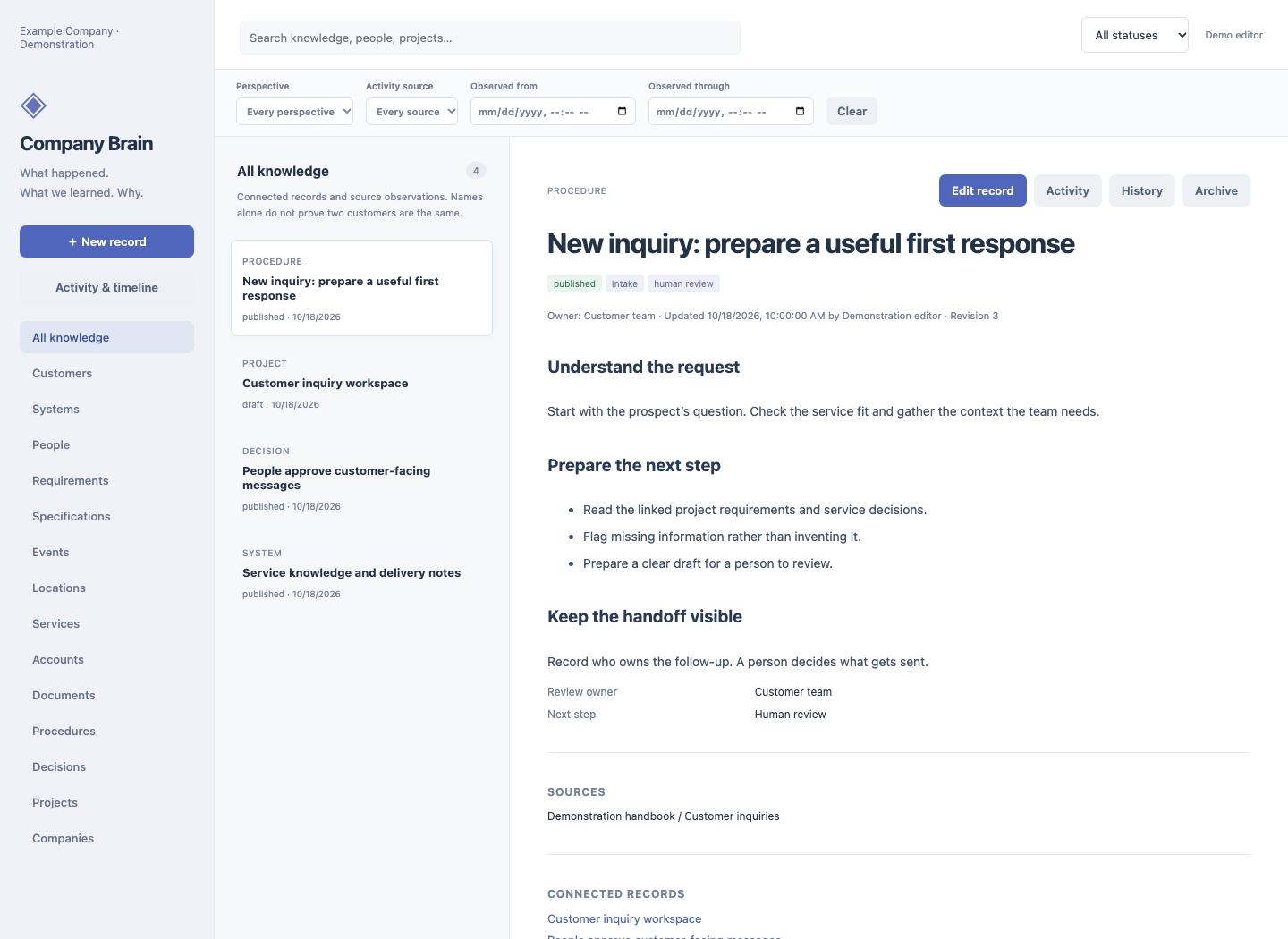
Company Brain: what your business knows
Working software. Keep procedures, decisions, projects, people, and systems in linked, searchable records. See sources, responsible owners, and revision history instead of relying on a conversation someone else had last week. Published knowledge can feed agent search in a configured deployment.
Company Brain supports both OfficeCrew and AppFoundry. Here it gives recurring work durable context; in an AppFoundry engagement it helps preserve requirements, decisions, and operating knowledge. The current Brain is company-shared, not a private notebook for each employee.
Tasks and agents: who does what next
Turn a request into a defined piece of work, give it an owner, and keep review and handoffs visible. Agents can gather context and prepare output; people remain accountable for the process. The task system, connected tools, and permitted actions are agreed for each deployment—not assumed from the illustration below.
CRM: relationships, opportunities, and follow-through
In development · local pilot running; customer integration not yet validated. CRM belongs inside OfficeCrew, alongside Company Brain—not as another disconnected place to maintain customer context. The intended scope is contacts, companies, opportunities, conversation history, and follow-up work.
A local Twenty pilot is running. Mailbox setup, permissions, backup and restore, and the agent handoff still need hands-on validation before we offer this as a ready-to-use module. If you already have a CRM, discovery starts there; replacing it is not a prerequisite for OfficeCrew.
How the pieces could work together
Illustrative workflow, not an available end-to-end CRM integration:
- A prospect emails an inquiry.
- The CRM tracks the relationship, opportunity, and next step.
- Company Brain supplies the relevant service knowledge and company procedures.
- OfficeCrew prepares a follow-up and flags missing information.
- A person reviews the draft and decides what gets sent.
See the software, current capabilities, and what is still being developed →
Personal Agents, Department Agents, or Both?
Start with the work and its access boundaries—not a fixed number of agents per employee.
- Department agents suit recurring work owned by a team: support preparation, operations briefings, shared knowledge, or a project queue. Give each a named human owner and approved departmental sources.
- Personal agents suit work that depends on individual permissions, private context, or a person’s own priorities. Keep personal information separate from shared team context.
- A hybrid combines shared department workflows with personal assistance where it earns its place. A handoff between them must respect the receiving person’s permissions; an agent role is not a substitute for access control.
The pilot defines what is shared, what stays private, who can request an action, and who can approve it. Separate identities or environments may be needed where the selected platform cannot enforce those boundaries.
Choose How Inference Is Funded
Customer-owned ChatGPT subscriptions: we support subscription-backed agent access through supported ChatGPT/Codex sign-in paths. For company use, we recommend a company-managed ChatGPT Business or Enterprise workspace rather than relying on personal accounts. The selected plan, seat entitlements, usage limits, and integration determine what is available; a subscription does not include general API usage or unrestricted shared access.
Customer-owned provider accounts: you maintain the agreed model-provider account and pay that provider directly. T3ch5 charges separately for setup and operation of the agent service.
T3ch5-managed inference: we can scope a managed arrangement with metered usage, an agreed billing basis, budget limits, and spending visibility. Provider choice, hosting, and management charges are defined in the proposal—not hidden behind an unlimited-use promise.
The model backend is separate from the workspace. Using Slack or Buzz does not determine which provider runs the model. Provider availability and integration support are verified for your deployment.
Give Each Agent a Real Job
These are example pilot scopes, not a list of preconnected products. Each integration and action is agreed and verified during setup.
Operations coordinator
Turn incoming requests into structured tasks, prepare daily briefings, flag missing information, and surface work that needs a human decision.
Research and knowledge assistant
Find relevant material in approved company sources, assemble cited answers, and prepare briefings for review. Keep the source visible so people can check the answer.
Customer-service support
Summarize a ticket, gather relevant history, and draft a response. Your staff reviews customer-facing messages before sending unless a narrower action has been explicitly authorized.
Development crew
Let your team work alongside agents on requirements, implementation, review, and documentation. OpenClaw in team / multi-player mode is our current foundation for this collaborative approach. Engineering review and release decisions remain accountable to people.
Useful Access, Clear Boundaries
- Defined roles: a job, an owner, and a clear boundary for each agent.
- Scoped connections: only the knowledge and tools needed for the agreed workflow.
- Human checkpoints: agree which actions may run, which need approval, and which are off limits.
- Visible work: define what activity, output, and exceptions the team needs to see.
- An operating plan: agree hosting, model providers, maintenance, support, and usage costs before rollout.
Capabilities depend on the selected systems and deployment. We validate access boundaries and approval paths in the pilot; we do not assume every vendor integration or action is ready out of the box.
Start Small. Earn the Next Role.
- Choose one workflow. Identify the recurring work, its owner, and a useful success measure.
- Define access and authority. Decide what the agent may read, draft, or change—and when it must ask.
- Pilot with your people. Use real operating scenarios with an agreed data scope, review the output, and test the failure paths.
- Expand what proves useful. Add roles and connections only when the first workflow earns its place.
No invented productivity percentages. Judge the pilot by agreed evidence: review time, task completion, output quality, and the effort required to supervise it.
Common Questions
Do we need an agent for every employee?
No. A department agent can serve a shared workflow, while personal agents can support individual work. We choose the arrangement around access, ownership, and the job—not a per-seat sales target.
Can we use the tools we already have?
We support a dedicated web portal, Slack, or a Buzz workspace provided with the service. Specific knowledge sources and business-system connections are scoped and verified during setup.
What does the service cost?
A proposal separates initial setup, ongoing management, and model usage or subscriptions. Start with a defined pilot and agreed spending limits. We do not promise unlimited inference or a fixed productivity gain.
Who stays in charge?
Your people own the process and the approval decisions. Each agent has an agreed role and access scope; we test the human checkpoints before expanding the workflow.
OfficeCrew or AppFoundry?
Choose OfficeCrew when the need is ongoing AI assistance inside your company: shared context, recurring tasks, defined agent roles, and collaboration with your staff.
Choose AppFoundry when the need is custom software: a portal, dashboard, application, or integration built around a workflow. Your team participates directly in development, with OpenClaw team / multi-player workflows supporting the build.
They can work together. OfficeCrew can help operate a process while an AppFoundry application supplies its interface or integration. T3ch5 remains your hands-on technical partner for both.